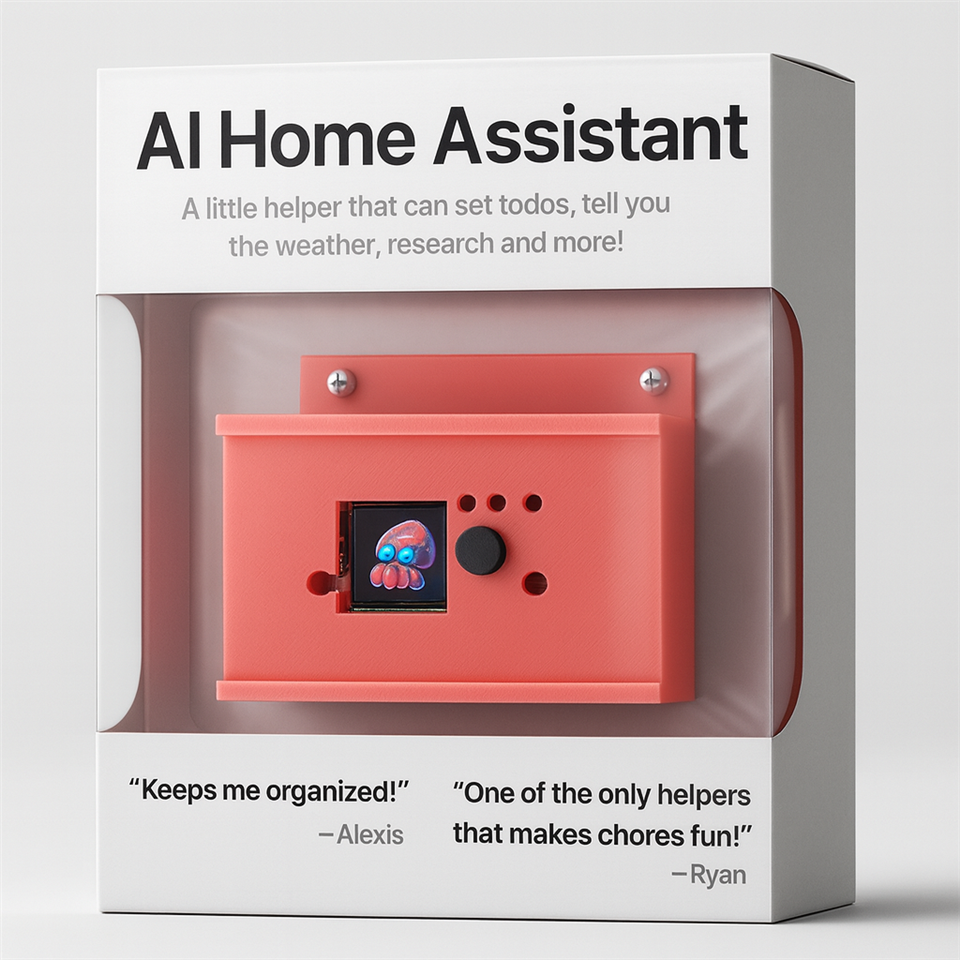
Aurora is an open source smart assistant designed for the Raspberry Pi and functional on Windows, Mac and anything else that can run Python.
Aurora uses the OpenAI realtime API, and is pretty similar to the advanced voice mode in ChatGPT. The idea is a replacement for Amazon Alexa and Google Home that anyone can build and extend.
I have had this running for nearly a year. It was functional but the code was a mess. OpenAI just promoted their realtime API from beta, and that prompted me to refactor the project and get it into shape for a public release.
While Amazon is slowly rolling out an LLM version of Alexa, I'm not buying another device that just wants to show me ads. I also don't want an assistant that has been engineered to minimize costs. Aurora is an exercise in what is possible using the best models available combined with helpful tools.
The project has a plug-in architecture for tool support, so you can pick and choose what makes sense. This first release supports timers, Perplexity Sonar, Todoist and a kid conflict resolution system that in my house is known as 'cheese night'. I'll be adding more tools over time, and the architecture makes it easy to contribute (please do!).
When I first designed Aurora I used an Adafruit BrainCraft HAT which has a small display and some nice LEDs. This combined with a Raspberry Pi 4 and a couple of speakers makes for a compact assistant. The project contains interface code for this specific setup, and also a generic version that will run anywhere. As with tool support the interface can be extended to support other devices.
Check out Aurora on GitHub, contribute if you come up with a cool tool or UI, and please send me a photo if you build an assistant.
Updated 2025-09-13 21:56:
Added support for the Bay Area 511 API to provide arrival times. You configure an agency and stop ID and then can ask 'when is the next L' and get arrival times. This is really useful for me. There is a new tool calling image state for the Raspberry Pi version and times are now poems based on the timer name.
Updated 2025-09-21 19:44:
Recipe support added. Ask Aurora to cook with you and she will guide you step by step through a recipe.
LIFX light bulbs are also now supported. Add names and IDs to settings and then Aurora can switch lights on and off.
Also added OpenSCAD and STL files for 3D printing a case for the BrainCraft version.
Updated 2026-02-28 18:46:
Upgraded to the new gpt-realtime-1.5 model. Also added a setting so it's easy to go back to the original gpt-realtime if that's what you prefer.
Updated 2026-06-27 23:20:
Added a flash briefing tool. By default this downloads and plays the most recent episode of the BBC Global News Podcast. There is a setting to override this with the RSS feed for the podcast of your choice.
Aurora also now features native wake word detection (more details here). This should work reasonably well out of the box, but you can also train it to better recognize your voice and environmental false triggers. It's also possible to train a new wake word from scratch if you'd prefer a different name.
Updated 2026-08-08 16:24:
Aurora gets into a lengthy discussion with Alexa, which eventually gives up.
Updated 2026-10-25 22:46:
Moved from Realtime to GPT-Live. This makes for a much more natural experience with full duplex and task chaining - you can now ask Aurora to switch on a light, add a to do item and tell you a story in one request. There are some configuration changes so if upgrading check .env.example and see the new example backend instructions (GPT-Live has instructions for the model talking to you, gpt-live-1, and the model handling tool calls, gpt-5.6-luna by default). A new version of the OpenAI client library is required as well so upgrade based on requirements.txt.
This simple script adds useful AI to Todoist and runs in the cloud on Google Apps Script.
I use Todoist to run my life, and my dream is for it to be able to complete certain types of tasks for me. With OpenAI Operator and Anthropic Computer Use this is getting closer and closer to reality. Yes, there is a risk that Todoist spends all of my money on paper clips. But there is also the upside that it will eventually do my weekly shopping, pay my bills and call back the dentist's office. Google's new Ask for Me is promising too, even if right now it's just going to bother nail salons out of existence.
I already put together an Alexa replacement using a Raspberry Pi and the OpenAI realtime API. It switches lights on and off, adds things to my to do list, figures out when the next L is coming and more (I'll blog more about this soon). One thing I learned is that this kind of thing can get pretty expensive. I can see why Amazon is procrastinating on an LLM Alexa. But costs keep going down, and the future will get more evenly distributed over time.
The first version of this script has two objectives. Respond to tasks, and create calendar events. Here's the script:
To get this working you need API keys from OpenAi and Todoist. Perplexity is optional, if you have a key add it at the top. It only works with tasks that have the right label, ai is the default - you can change this with AI_TASK_LABEL. I initially developed this with o1, but it looks like the tool use was rushed out too quickly and it calls the same tool repeatedly. GPT-4o works well enough and you can test switching out the model by changing OPENAI_MODEL.
Quick configuration guide - create a Google Apps Script project in Google Drive. Paste in the code above and add your API keys and any other desired configuration changes. Go to Project Settings in the right hand navigation and make sure your time zone is correct. Then go to Triggers and schedule the function trigger to run periodically (I use every 5 minutes). You should be done.
Back in Todoist add the ai label to a task (or whatever label you set in the script) and the AI will respond. With the current script there are two use cases - ask it to create an event (it can invite people, add details to the description, etc.), or ask it to research some aspect of the task you're working on. I think this is helpful because it has the full context of the task, and while you're working in Todoist it's useful to store the history there as well.
The point here is to extend the number of tasks that the script can take on. Add new tools for the AI to consider in the getTools() function, and then wire that tool into an implementation in generateAIResponse(). createCalendarAppointment() is a good example of using built in Google services - as well as the calendar it's pretty easy to interact with email, Google docs and many more. I'm planning to add file uploads as well, and will update this post with iterations of the script that add helpful functionality.
OpenAI recommends around 20 tools as the maximum. At that point it might be necessary to break this up into multiple assistants with different tool collections.
Let me know in the comments if you manage to use this to start crossing anything off your list.
Updated 2025-02-17 01:18:
Updated the script to support images and Perplexity.
Image support takes advantage of multimodal input. Any image attachments will be sent as part of the conversation. This uses the large thumbnail in Todoist by default. It supports JPEG, GIF, PNG and WEBP. If a thumbnail is not available it will send the full size image without resizing, depending on how large this might not be accepted by OpenAI.
Perplexity is implemented as a tool (so OpenAI is always called, and it may optionally call out to Perplexity to get more information). This is useful for web search, local search and knowledge past the training cutoff for the OpenAI model. It's optional, if you don't include a Perplexity API key then it just won't be used.
Here's a simple use case - add a photo of a book and ask Todoist to find the URL where you can order it on Kindle.